


During presales demos or conceptual planning prior to Microsoft Business Central implementations, it is a common question whether it is possible to record incoming invoices using invoice codes and thus support those invoice recording users who do not have adequate financial knowledge and do not find their way in the world of chart of accounts or financial dimensions.
The short answer is: Yes
What is an invoice code?
Invoice codes are codes that identify and categorize different items in incoming invoices. These codes are usually short, easily recognizable and clearly defined strings of characters that businesses can use to track exactly which expenditure was spent for what purpose and to which cost center or type of cost it relates.
How do we use invoice codes?
-
Code design: When designing invoice codes, it's a good idea to choose a system that's easy to understand and logically structured. For example, codes can contain letters and numbers that identify the cost center, type of expenditure, and project.
-
Training: It is important that everyone involved in your business understands the importance and correct use of invoice codes. To this end, it is worth holding regular trainings.
-
Integration into the financial system: Invoice codes must be integrated into the financial system of the enterprise so that accounting and administrative processes run smoothly. This may require customizing existing systems or introducing new software.
-
Regular review: Regular review and updating of invoice codes is essential to ensure continued accuracy and efficiency. As business activities change, you may need to introduce new codes or modify existing ones.
How do I access invoice codes for incoming invoices in Microsoft Business Central?
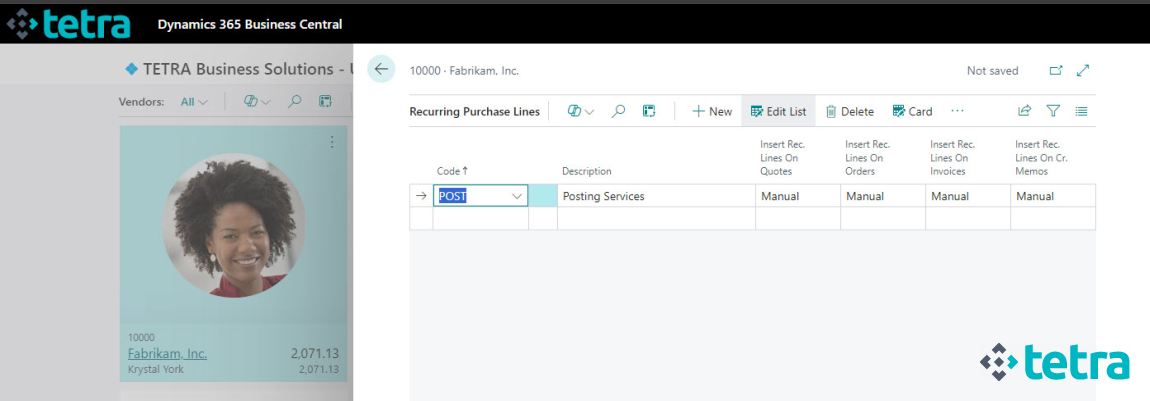
Open the Recurring Purchasing Lines page and enter the invoice code, then assign the appropriate account for accounting purposes.

The recurring purchase lines can be assigned to the Vendors, where you can specify how the invoice code is applied when a new document is recorded.
-
Manual: the user has to initiate the assignment
-
Automatic: during the creation of the document, the document rows are automatically populated with the invoice codes
-
Always ask: warning message is displayed to ask if the invoice codes should be populated
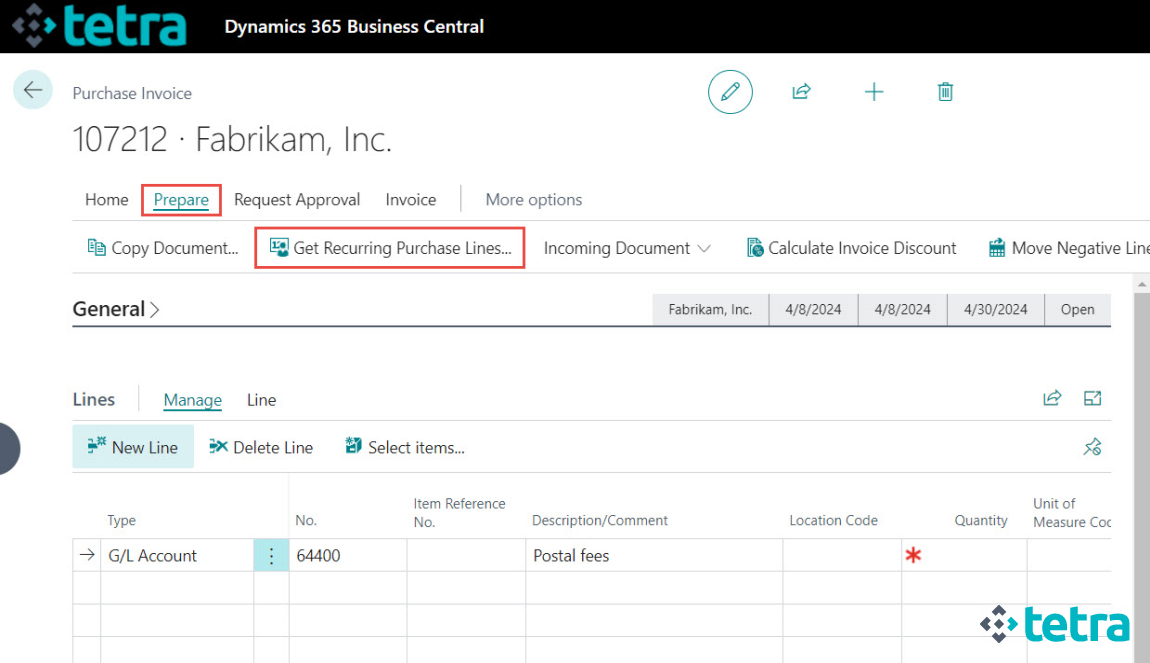
In manual mode, use the Get Recurring Purchase Lines function on the purchase document to apply the invoice code.
Tags
We are proud to work with them


 2089 Telki, Öreghegyi út 31/A Hungary
 +36 30 502 0648