
There are two assisted setup wizards:
2. Assisted Application Setup
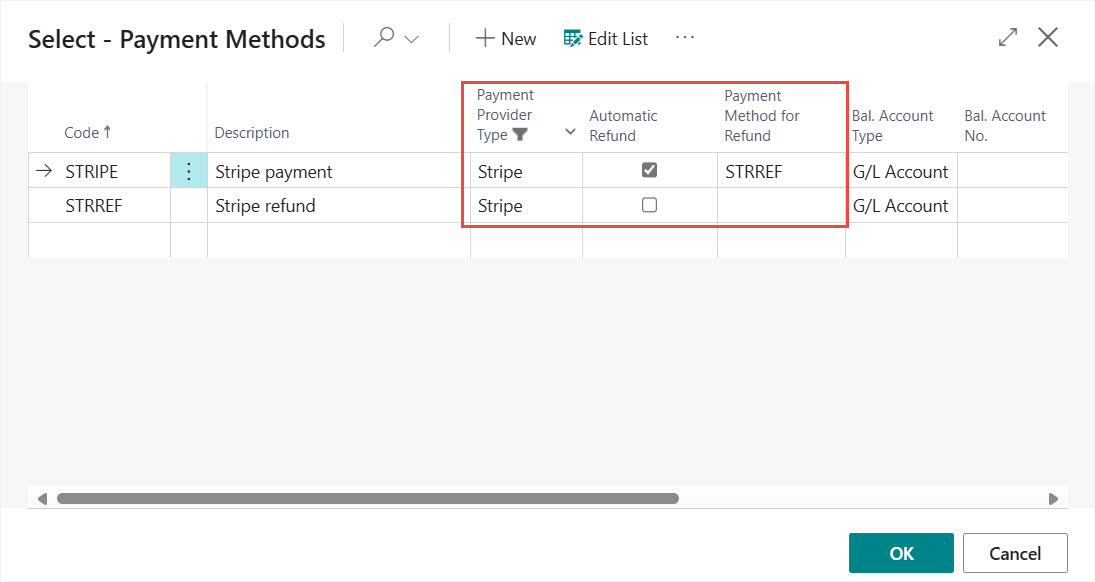
On the first page you can set up Payment Methods for Stripe. The Payment Method used on sales documents will drive if Stripe related functions are available or not. Here you can create a new Payment Method or select an existing one.

If you create a new Payment Method then please consider the following Stripe related fields on the payment method list:
- Payment Provider Type: Specifies if Stripe related actions, menus and fact boxes are available on sales documents
- Automatic Refund: Specifies if a Stripe refund is automatically generated when a Posted Sales Invoice is cancelled with a Sales Credit Memo and the original invoice was paid with using a Stripe Payment Link
- Payment Method for Refund: Specifies the Payment Method used for automatic Stripe refunds. If empty then the original Payment Method will be used that was on the Posted Sales Invoice
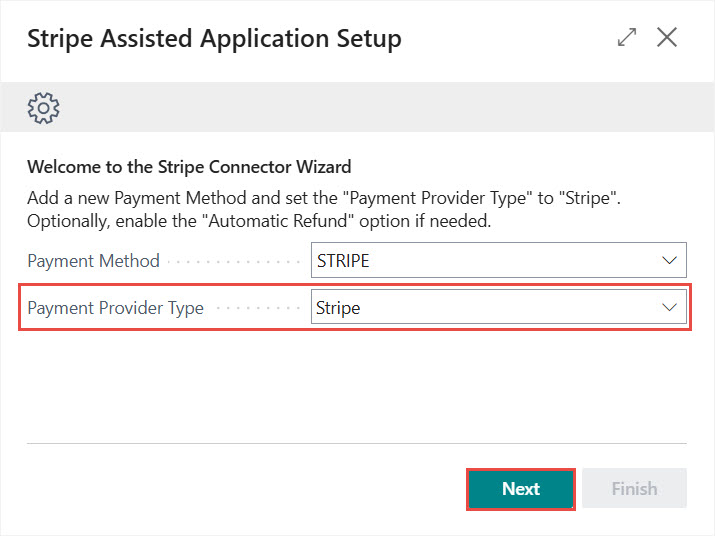
If you select an existing Payment Method then set the Payment Provider Type to Stripe on the Assisted Application Setup page, then click Next.
On the next page you can set up Payment Terms. Click on the Payment Terms link to create a new or set up an exisiting Payment Term.

If you create a new Payment Term then please consider the following Stripe related fields on the payment term list:
- Stripe Payment Action: Specifies the action that is automatically executed when the user sets the sales document status to Released.
- Stripe Payment Action Document Filter: Specifies on which sales document types the automatic payment link sending is available when the sales document status changed to Released
- Due Date Calculation: Specifies a formula that determines how to calculate the due date. For Stripe Payments the formula should be 0D

The combination of Stripe Payment Action Document Filter and Stripe Payment Action settings drive the automatic payment link or invoice sending when a document is released.
When you are done setting up Payment Terms, please click on Finish.
We are proud to work with them


 2089 Telki, Öreghegyi út 31/A Hungary
 +36 30 502 0648