
In Microsoft Dynamics 365 Business Central, you can configure multiple email accounts. You can send emails to business contacts, such as customers without having to open an email app.
To ensure email sending, at least one properly working email account should be set in the system.
In Business Central, choose the Search icon 🔎 in the top-right corner, enter Set Up Email, and then choose the related link, which will open the assisted setup guide. After you have read the information, select Next.
Specify the type of email account to add by choosing one of the following options and then select Next.
- Microsoft 365
- Current User
- SMTP
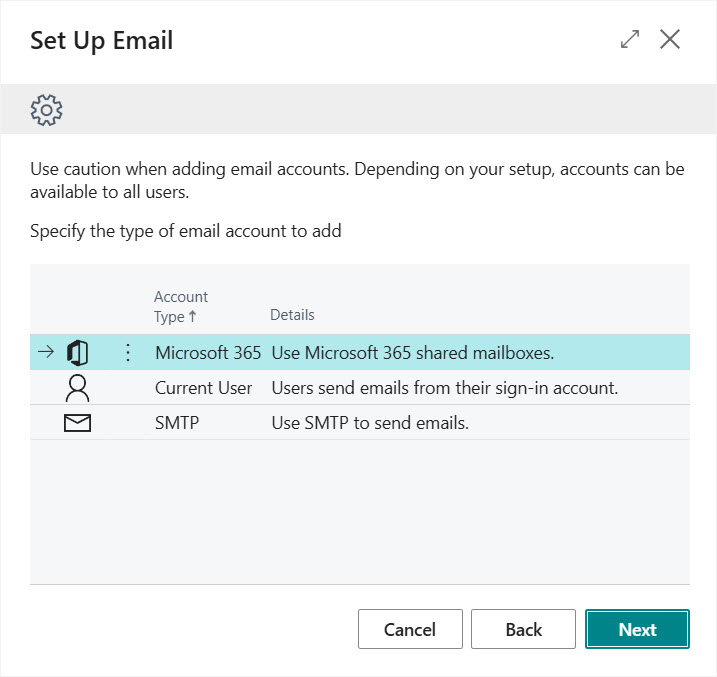
If you selected to set up a Microsoft 365 account, enter the following details:
- Account Name
- Email Address
If you selected to set up an account for the Current User, Business Central will use the account settings of the sign-in account, and the account will be set automatically. Before finishing the assisted setup guide, you can specify if this account should be the default one by selecting the Set as default field.

If you selected to set up an SMTP account, enter the following details:
- In the Account Name field, enter the name of the SMTP account.
- In the Sender Name field, enter the name that you want to add in front of the sender email address.
- Enter the email address.
- In the Server URL field, enter the name of the SMTP server.
- In the Server Port field, enter the port of the SMTP server. The default setting is 25.
- In the Authentication field, select one of the following authentication methods:
- Anonymous
- Basic
- OAuth 2.0
- In the User Name field, enter the username to use when you are authenticating with the SMTP server.
- In the Password field, enter the password of the SMTP server.
- Select the Secure Connection field if your SMTP mail server setup requires a secure connection that uses a cryptography or security protocol, such as secure socket layers (SSL). Clear this option if you don't want to enable this security setting.
When the account settings are specified, follow the wizard steps and then close the wizard when you're finished.
You must have a default email account, even if you add only one account. The default account will be used for all email scenarios that aren't assigned to an account.
We are proud to work with them


 2089 Telki, Öreghegyi út 31/A Hungary
 +36 30 502 0648